Draw From Photos With Perfect Proportions
Use the classic grid method to break any image into easy sections. Focus on one square at a time and create accurate drawings that match your reference photo.
Everything You Need For Better Drawing Practice
Custom Grid Overlay
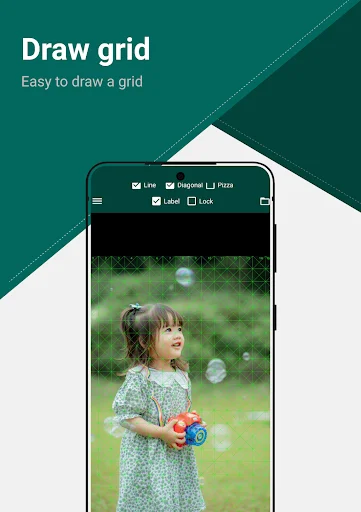
Place adjustable grid lines over any photo to divide it into smaller, manageable squares. Copy one section at a time instead of guessing the whole image at once, making complex subjects feel simple and achievable.
Match Your Paper Size
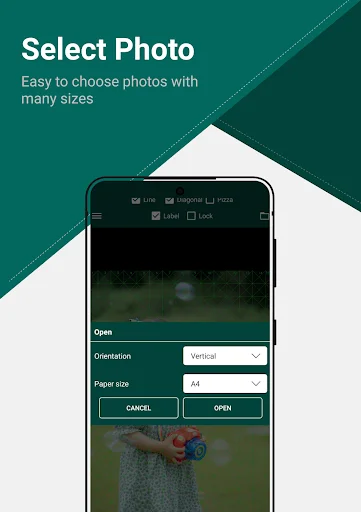
Set your grid to match the exact ratio of your drawing paper. No more confusion about sizing – your digital reference and physical sketch will have the same proportions, so your artwork turns out exactly as planned.
Visual Clarity Filters
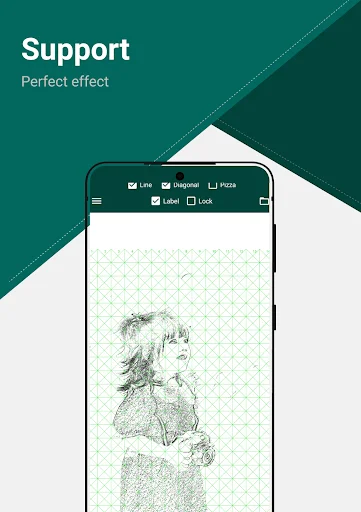
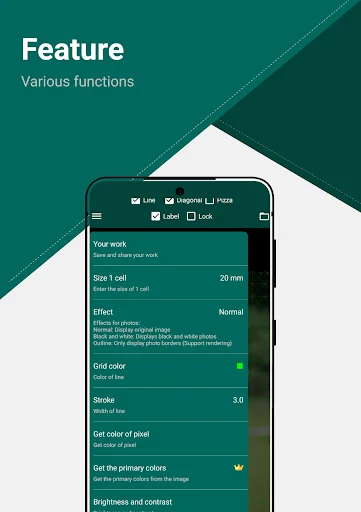
Apply helpful filters like line drawing, outline, or black and white to see shapes and shadows more clearly. These tools help you understand what to draw, making details easier to notice and copy accurately.
Simple and Straightforward
Open a photo, add your grid, adjust settings, and save – that's it. No confusing menus or overwhelming features. Spend your time drawing, not learning complicated software.
About Drawing Grid For The Artist
Grid Art: Drawing Desk - Add Grids To Photos For Easier Drawing!
Grid Art: Drawing Desk will assist you in placing clean grid lines over an image so you can study proportions, copy reference photos, and prepare artwork with better visual guidance. Grid Drawing: Graph Paper is useful when you want your picture to match a paper-style ratio before you begin sketching. Drawing Grid For The Artist helps painters, students, illustrators, and hobby creators break a reference image into smaller parts that are easier to follow.
Artist Grid And Reference Tools:
- Grid Maker: Art Reference Tool - Add a custom grid over your selected image
- Grid Photos: Line Drawing App - Turn photos into clearer drawing references
- Grid Paper: Photo To Sketch App - Match the grid with paper size ratio
- Photo Drawing Helper - Use photos as drawing guides for sketches and practice
- Grid Art: Drawing Desk - Prepare artwork with simple grid-based support
- Grid Drawing: Graph Paper - Follow rows and columns while copying details
- Drawing Grid For The Artist - Study size, spacing, and object placement more easily
Create reference grids, check image size, use filters, and save your work!
Grid Maker: Art Reference Tool is helpful when a full image feels too difficult to draw at once. By dividing the picture into smaller squares, you can focus on one section at a time and keep the final sketch closer to the original reference.
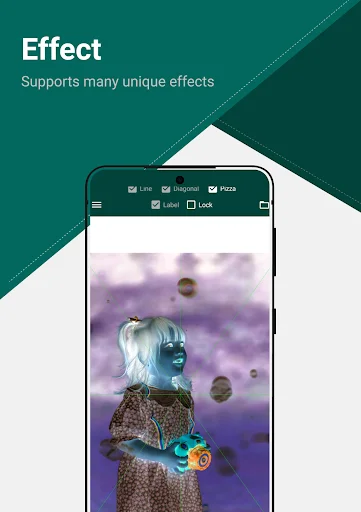
Grid Photos: Line Drawing App also supports image filters, which can make shapes, shadows, and important details easier to notice. This is useful when preparing portraits, objects, landscapes, craft drawings, or practice sketches.
Simple Grid Drawing Flow:
- Open Photo Drawing Helper, and choose an image from your device
- Use Grid Art: Drawing Desk to place grid lines over the photo
- Adjust Grid Drawing: Graph Paper settings to match your paper ratio
- Open Grid Maker: Art Reference Tool to refine the grid layout
- Try Grid Photos: Line Drawing App filters for clearer visual details
- Check the actual image size before saving your reference
- Save the final image with the grid applied
Better Proportions For Drawing Practice:
Drawing Grid For The Artist is useful when you want to copy a photo more carefully without losing the shape or spacing of the subject. The grid method helps you compare small areas instead of guessing the full image at once. It can support beginners learning proportions and experienced artists who need a clean reference before starting a project.
Photo Reference With Useful Details:
Grid Paper: Photo To Sketch App helps you prepare images for sketching by showing a structured layout over the photo. You can view the actual image size, apply filters, and pick colors from the image when studying tones or planning your drawing. Photo Drawing Helper keeps those reference details easy to access while you prepare your artwork.
Make Photo-To-Drawing Practice More Accurate!
Grid Maker: Art Reference Tool gives you a simple way to turn any selected image into a useful art reference. Whether you are sketching by hand, practicing line drawing, copying a portrait, or preparing a study piece, Grid Paper: Photo To Sketch App helps make the process clearer and more organized.
See How Easy It Is To Use
Join Over 1 Million Artists Who Draw Better
Wow. super App. I'm using this app SINCE 2021. This was fantastic and amazing creation. Useful for beginners to improve their art ability. Super. I...
Nice for Artist it has many features like pixle, black and white, oil, outline, sketch, neon u can set paper size as per the grids very nice app it...
Best of all the similar apps I have tried. Nice and straightforward to use but very effective. I particularly appreciate the line drawing filter to...
some other apps don't have features like diagonal lines,but this app has that,I like this app very much, highly recommend!!!🔥
Awasome experience. I really required something like this, it help me to draw the image perfectly and more realistic way.
this is the best drawing grid app I recommend for any artist to use. it has became My favorite, it is very simple to use,
Start drawing with better accuracy today!
Join millions of satisfied users who have already transformed their experience.
Available on Google Play Store • Free to download