
Type Tamil Easily – No Training Required
Join 5 million+ users who discovered the easiest way to type in Tamil. Whether you never learned Tamil typing or want a simpler solution, Ezhuthani makes Tamil communication effortless on your Android device.
Everything You Need for Tamil Communication
Type Without Typing Skills
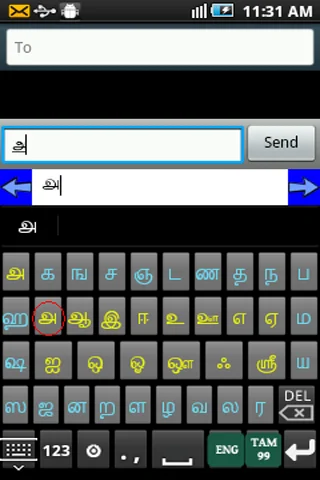
Never learned Tamil typewriting? No problem. Ezhuthani's intuitive keyboard layouts let anyone type Tamil text instantly, even if you've never typed Tamil before. Start messaging in your mother tongue today.
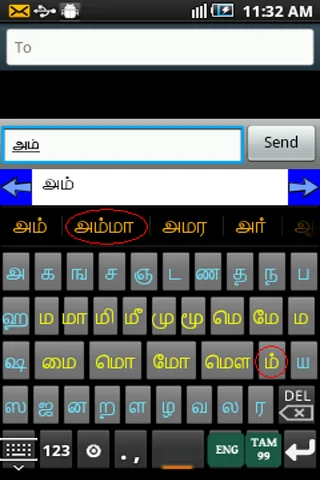
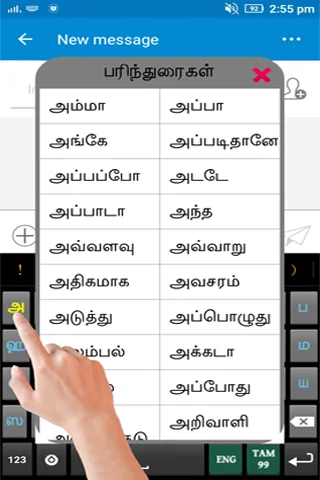
Smart Tamil Suggestions
Type faster with intelligent word predictions in Tamil. Our keyboard learns as you type, suggesting the right words and making your Tamil conversations quick and accurate.
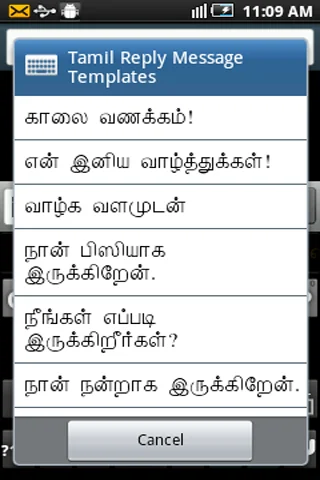
Ready-Made Message Templates
Save time with pre-written Tamil reply templates for common messages. Respond instantly to greetings, invitations, and everyday conversations with perfectly crafted Tamil text.
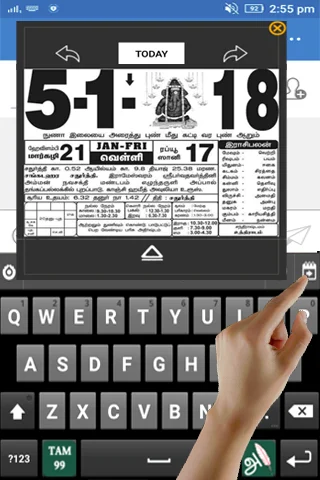
Cultural Features Included
More than just a keyboard – enjoy Tamil calendar, voice notes, motivational quotes with audio, and traditional pictures. Stay connected to Tamil culture while you communicate.
About Ezhuthani - Tamil Keyboard
Ezhuthani 2 - Tamil Soft Keyboard
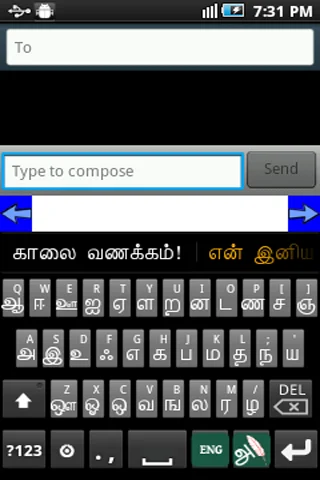
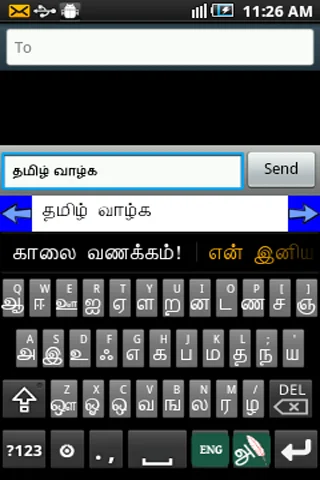
Ezhuthani Version 2 is a unique keyboard for naive users with Tamil99 and Ezhuthani Keyboard Layouts with full fledged Tamil Suggestion Keywords support with Tamil Reply Message Templates.
We will definitely add more features and more keyboard layouts in the future based on your feedback and encouragements. We tested on major Android phones and Tabs (version 2.3 and above, for Previous Versions you can use the Ezhuthani 1.0.9 or older versions). Use the keyboard layout the way you want, and leave your comment with changes and features you want in it.
How to Enable Ezhuthani (Tamil Keyboard) on your Mobile
Android Version 2.0 and above
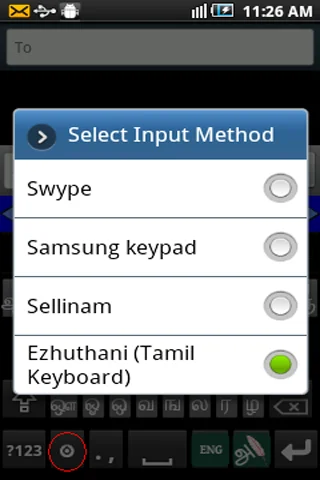
- Settings - Locale and Text - Select Ezhuthani (Tamil Keyboard).
- Long press in a text box and select input method and then select Ezhuthani (Tamil Keyboard).
Android Version 3.0 and above
- Settings - Language and input - Configure input methods - Enable Ezhuthani (Tamil Keyboard) - Go Back - Current input method - Select Ezhuthani (Tamil Keyboard)
Android Version 4.0 and above
- Settings - Language and input - Enable Ezhuthani(Tamil Keyboard) - Select Default - Select Ezhuthani(Tamil Keyboard)
Other Steps to ensure working of Ezhuthani
- After installation, you can verify the Ezhuthani Installation, Open "Settings" and go to "Language and Keyboard" - you can see the Ezhuthani Keyboard on listing.
- To Make Input method as Ezhuthani Tamil Keyboard. Theoretically, you can use with any textbox (SMS, Search or wherever the textinput requires), You can find a keyboard icon at top left of title bar, please click on that.
- Choose an input method such as "Ezhuthani Keyboard." Your Android Mobile will now use this method.
- You can find Ezhuthani Tamil Keyboard Controls to type Tamil, Enjoy!
Mary Martin Team dedicated this product to the Tamil Community as a Free Android App. Please use and enjoy!
Mary Martin Team!
See How Simple Tamil Typing Can Be
Loved by the Tamil Community Worldwide
Have very good experience in using this Tamil keyboard in mobile which is second to none whereas I wish to use this keyboard in desktop computer to...
Really it's an awesome tamil keyboard after a long hunt in play store... It works really really oool those who are all searching for tamil keyboard...
I am using it for the last 4 years. User friendly. Good and so easy to do tamil messaging. At your new starting you feel some difficulties. After 1...
Excellent works. Background Theme is very nice... Tamil typing words are easy... It's my suggestion use thiz applications... 😊😊😊 தமிழால் இணைவோம்! அ...
All in one app... Ezhuthani has more extra features like calendar, voice notes in Tamil, motivational quotes (in words & audio), pictures(comedy & ...
Without knowing type-writing, I am typing things in Tamil easily by the help of Ezhuthani Tamil Key board. Thanks; I likes it and It's worth for 5 ...
Start Typing Tamil in Minutes – Download Free
Discover what our growing community loves about this app.
Available on Google Play Store • Free to download