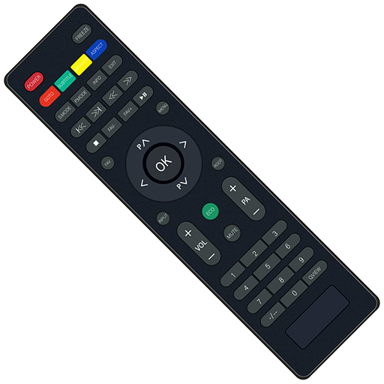
Your Phone Is Now Your TV Remote
Lost your Weston TV remote? Dead batteries? No problem. Turn your Android phone into a fully functional TV remote in seconds with built-in infrared control.
Everything You Need to Control Your TV
No Remote Required
Never worry about lost or broken remotes again. Your phone becomes a complete replacement controller, giving you instant access to all essential TV functions whenever you need them.
Full TV Control
Power your TV on and off, change channels, adjust volume, navigate menus, and enter channel numbers directly. Access every function you use daily through one simple interface on your phone.
Multiple Remote Layouts
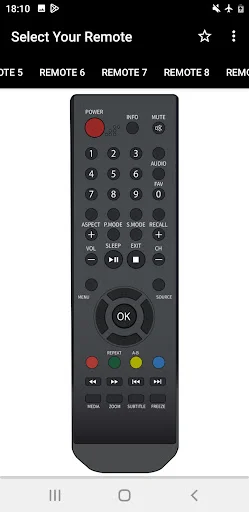
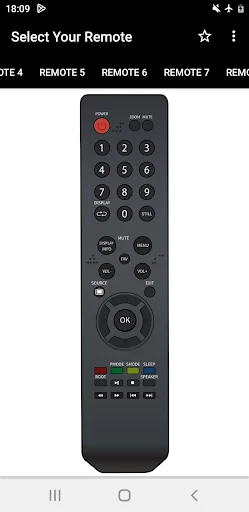
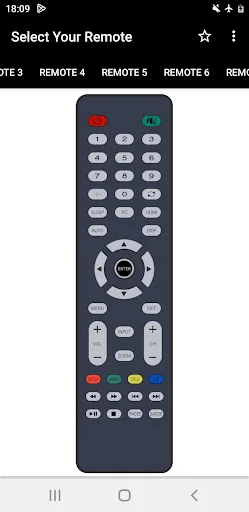
Choose from several remote designs to find the perfect match for your Weston TV model. Different layouts ensure better compatibility and more reliable performance with your specific television.
Always Available Backup
Keep a spare remote in your pocket at all times. When the physical remote disappears between couch cushions or runs out of batteries, your phone is ready to take over immediately.
About Weston TV Remote
What is Weston TV Remote?
This Android infrared remote-control app lets you use a compatible phone to operate supported Weston televisions. Use common TV controls to change channels, adjust volume, enter channel numbers, open menus, and navigate on-screen options when a physical remote is unavailable.
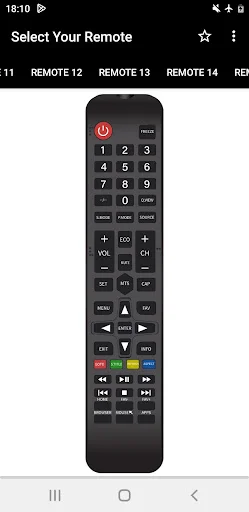
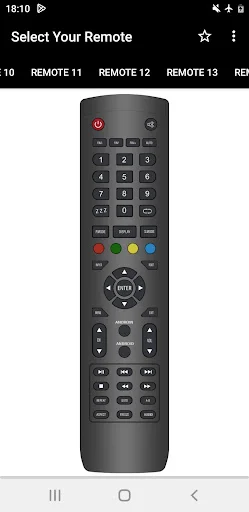
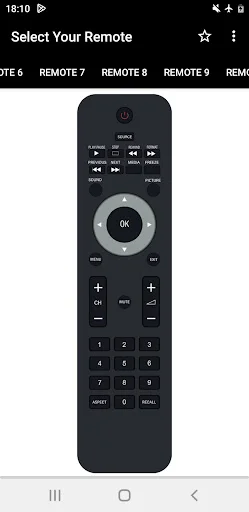
The app provides several remote layouts with familiar buttons. It communicates through your phone's built-in infrared sensor, so the required IR hardware must already be present.
Who is Weston TV Remote for?
Use the app with a supported Weston television and an Android phone that has an infrared sensor. It can help when the original remote is misplaced, its batteries are empty, or you want a spare controller on your phone.
Handle everyday tasks such as power, channels, volume, menu navigation, and number entry. Compatibility depends on both the phone and television, so this is not a universal remote for every TV model.
What does Weston TV Remote do?
- Control power: use the on-screen power button with a compatible TV.
- Change channels: move up or down through available channels.
- Adjust volume: increase or decrease the TV sound from the remote screen.
- Enter numbers: use the numeric keypad when selecting a channel directly.
- Navigate menus: use the directional controls and confirmation button.
- Access familiar functions: use menu, back, mute, input, and colored buttons where supported.
- Choose a remote layout: try the available designs to find one that responds to your TV.
- Keep controls on your phone: use the mobile interface when the physical controller is unavailable.
Buttons and functions can differ between layouts. A displayed button may not perform the same action on every TV model.
How does Weston TV Remote work?
Confirm that your Android phone includes an infrared sensor or IR blaster. Open the app, choose a remote layout, point the phone toward the television, and test a command such as power or volume.
If the TV does not respond, return to the selection and try another layout. Keep the phone aimed toward the TV while pressing a button. Physical objects between the phone and television can interfere with the signal.
After finding a compatible layout, use its number pad, volume and channel keys, directional pad, and other controls. Response depends on the phone's IR hardware, TV model, distance, angle, and layout.
Compatibility and requirements
The app requires Android 8.0 or later and a phone with a working built-in infrared sensor. It cannot add infrared hardware. Phones without an IR sensor cannot use its remote-control function.
Compatibility is limited to supported Weston televisions and layouts. An infrared sensor does not guarantee that every TV model or button will work. Wi-Fi, Bluetooth, and voice control are not supported features in this description.
The app contains ads and offers in-app purchases. It is an independent remote app and is not affiliated with, authorized by, or endorsed by the television manufacturer. Product names are used only to identify compatibility.
Privacy
Device or other identifiers may be shared with third parties. No data is declared as collected. Data is encrypted in transit and cannot be deleted. Privacy practices may vary by use, region, and age.
Weston TV Remote gives compatible phones a practical set of infrared TV controls for everyday channel, volume, power, number-entry, and menu navigation tasks.
See the Simple Interface in Action
Join Thousands of Happy Users
U want Unknown brand tv remote? Definitely this app done. Don't waste of your time in other apps like select random tv remote, ever brand have 10re...
Great app working perfectly on my tv, really appreciate the developer for this app user interface. This app amazed me to much, I only came to searc...
very very very very very best beat best 💓💓💓💓💓💓💓💓💓💓💓 All types of remote is here ,go with this app without any hesitation...
Very Good & useful app ☺️👍 Number 7 Remote works for my LCD. Thanks 😊
Nice App Finally I got the remote for my (MITSUN) TV
Wow It's Working For china led tv
Download now and control your TV today
Discover what our growing community loves about this app.
Available on Google Play Store • Free to download